

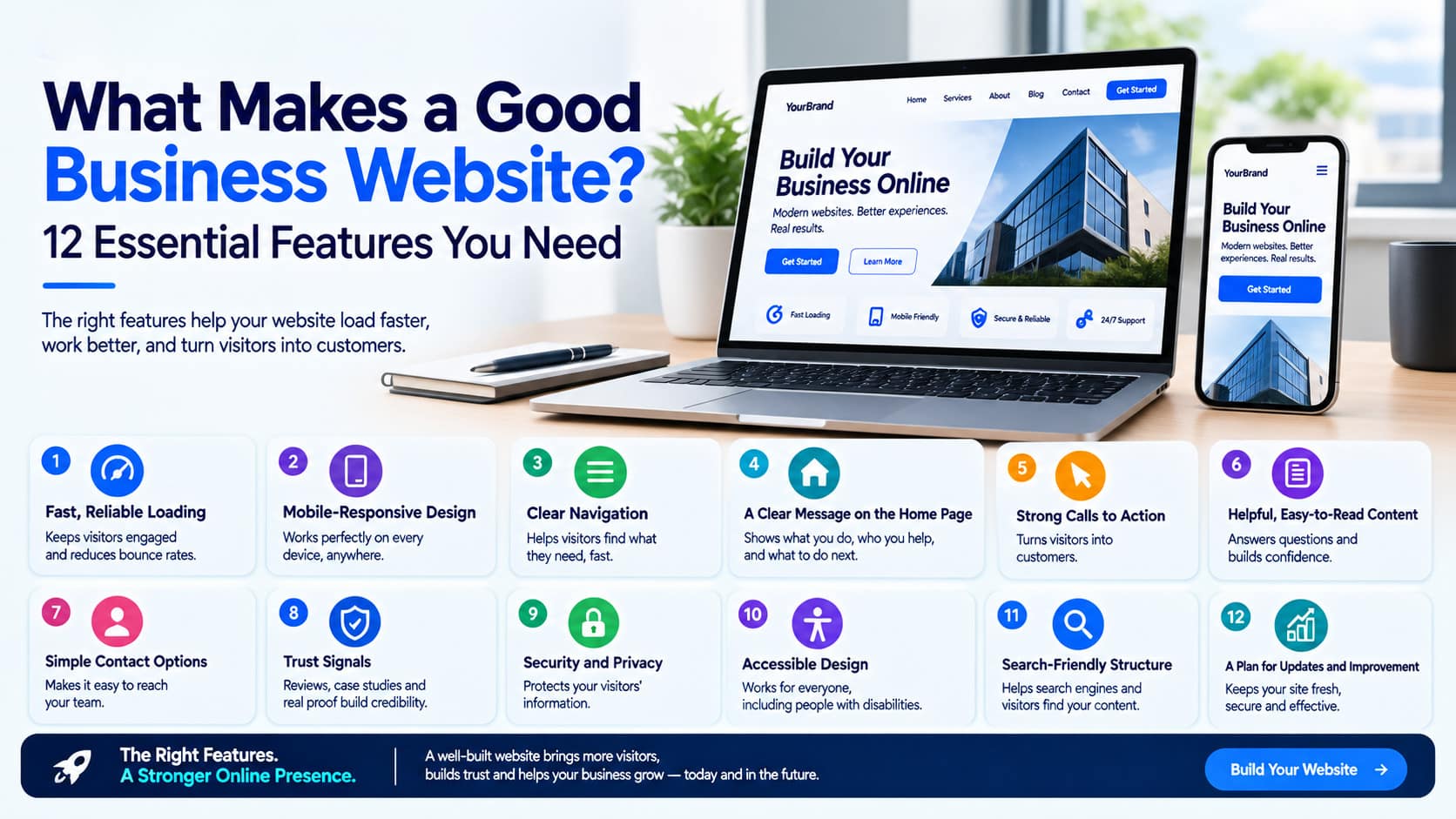
A business website has to do more than look attractive. It should explain what you offer, help visitors find the information they need, and make it easy for them to contact you or become customers. If people cannot use the site comfortably, its visual design alone will not make it effective.
The best websites bring several elements together. They load reliably, work on mobile devices, present information clearly, and guide visitors toward a useful next step. They also give your team a foundation for future content and marketing.
At Aene Enterprise, we look at a website from both sides: what customers need when they visit and what the business needs the site to achieve. Whether you are building a new site or improving an existing one, these 12 Business Website Features will help you identify what matters most.
1. Fast, Reliable Loading
Visitors should be able to open a page and start using it without a long wait. Speed matters throughout the site, especially on pages where someone is trying to compare services, complete a form, or make a purchase.
Large images, unnecessary animations, and too many third-party tools can make pages feel slow. Good web development includes choosing suitable image sizes, using features carefully, and checking how the site performs on different devices.
Speed should also be consistent. A home page that loads well does not help much if your service pages or contact form are frustrating to use. Review the pages that matter most to your customers, then improve the elements slowing them down.
A fast site will not guarantee more sales, but it removes an obstacle between visitors and the information they came to find.
2. Mobile-Responsive Design
A good business website must work comfortably on a phone as well as a desktop computer. Mobile responsiveness means the layout adapts to different screen sizes without making visitors zoom, scroll sideways, or struggle to tap buttons.
Check more than the home page. A service page may look good on a desktop but become difficult to read on a smaller screen. Menus, forms, pricing tables, and checkout steps all need attention.
Mobile design also affects content decisions. Long blocks of text are harder to scan on a phone. Important information should appear in a sensible order, and buttons should be easy to find and use.
For a business, the goal is straightforward: visitors should be able to use your website wherever they are.
3. Clear Navigation
Visitors should not have to guess where to find your services, prices, contact details, or other important information. A clear menu helps them understand what your business offers and how the website is organized.
Use familiar, descriptive labels. “Services” tells people more than a creative label that needs interpretation. If you offer several services, group them in a way that makes sense to your customers. Keep the navigation consistent as visitors move between pages.
The same principle applies to links within your content. A relevant link can help someone move from a general overview to the detailed page they need. It can also help them find a related answer without returning to the menu.
Good navigation begins with a clear page structure. Plan that structure around the questions your visitors are likely to ask.
4. A Clear Message on the Home Page
When someone arrives on your home page, they should quickly understand three things: what your business does, who it helps, and what they can do next.
A vague headline may sound impressive but leave visitors uncertain. A clear headline, followed by a short explanation, gives them a reason to keep reading. Visitors should not have to search through several pages to understand your main offer.
Your home page does not need to explain everything. Its job is to introduce the most important information and direct people to the right pages. Services, proof of your work, and a clear next step should all be easy to locate.
This is one of the most valuable areas for thoughtful UI/UX design. The layout should support the message, making it easier to understand rather than adding distractions.
5. Strong Calls to Action
A call to action, or CTA, tells visitors what they can do next. Depending on your business, that might be “Request a Quote,” “Book a Consultation,” “View Our Services,” or “Shop Now.”
A good CTA is specific to the page. On a service page, an invitation to discuss that service is more useful than a generic button with no context. On an article, a link to a relevant service or contact page may be the natural next step.
Place calls to action where visitors are ready to use them. Some people will want to act after reading the first section; others need more information. Giving them a clear option at appropriate points can help without making the page feel crowded.
Buttons should also look and behave like buttons. Their wording, color, and placement should make the next step obvious on both desktop and mobile screens.
6. Helpful, Easy-to-Read Content
Your website content should answer real customer questions. Visitors may want to know what a service includes, how your process works, who you have helped, or how to get started.
Write in plain language and organize information with useful headings. Short paragraphs, relevant examples, and clear page titles help people scan for the details they need. Avoid filling pages with repeated claims that do not explain anything specific.
At Anene enterprise, we believe every important page should have a clear purpose. A service page should explain the service and help the right visitor decide whether to inquire. An about page should show the people, experience, or approach behind the business. A contact page should make reaching your team simple.
Useful content also supports digital marketing. When you publish articles that answer customer questions, those pages can give people another way to discover and understand your business.
7. Simple Contact Options and Forms
A visitor who wants to contact you should not have to search for a way to do it. Make your contact page easy to find, and provide the details appropriate for your business, such as an email address, phone number, location, or inquiry form.
Keep forms focused. Ask for the information you need to respond, rather than making every visitor complete a long questionnaire. Use clear labels and explain what will happen after they submit the form. A confirmation message helps people know their inquiry was received.
Forms should also be easy to complete on a phone. Check that fields are large enough to use, instructions are clear, and error messages explain how to fix a problem.
If you are planning a new website, you may also be deciding which features fit your budget. Our guide, How Much Does It Cost to Build a Professional Website?, explains how design, features, and maintenance affect the overall cost.
8. Trust Signals
Before contacting an unfamiliar business, visitors often look for reasons to feel confident. Your website should make it easy for them to see who you are and what you have done.
Relevant trust signals may include customer testimonials, case studies, examples of completed work, team information, business details, or clear explanations of your process. Use proof that fits your industry and that you have permission to publish.
Specific examples are more helpful than broad claims. A case study that explains a customer’s problem and the work completed gives visitors something concrete to consider. A testimonial can add perspective when it describes a real experience.
Trust also comes from accuracy. Keep your contact details current, fix broken links, and make sure your website reflects the services you offer today. An outdated page can create doubt even when the rest of the site looks polished.
9. Security and Privacy
Visitors should feel comfortable using your website, particularly when they submit personal information or make a payment. Security is therefore an essential part of the website.
Your site should use HTTPS to protect information sent between a visitor’s browser and the website. Forms, accounts, and connected services should also be set up carefully, especially when they handle customer details.
Security requires ongoing attention. Keep website software and plugins updated, use appropriate access controls for staff accounts, and make sure someone is responsible for handling issues. If your site accepts payments, choose a payment setup suited to your business.
At Aene Enterprise, we treat security as part of responsible website planning. The exact measures depend on what the site does, but every business should know who manages updates and how problems will be addressed.
10. Accessible Design
A useful website should work for as many people as possible, including visitors with disabilities. Accessibility improves how people read content, navigate pages, and complete important tasks.
Practical details include readable text, sufficient color contrast, descriptive links, clear form labels, and the ability to use menus and buttons with a keyboard. Images that convey important information should have text descriptions.
Accessibility should be considered throughout design and development. It is easier to create clear headings, usable controls, and sensible page layouts from the start than to repair every page later.
These improvements often help other visitors too. Clear labels, readable content, and predictable navigation make a website easier to use in many situations, including on a small phone screen.
11. Search-Friendly Structure
A good website should help search engines understand its pages and help visitors find the information relevant to them. That starts with a logical structure.
Each important page should have a clear topic, a descriptive title, useful headings, and content that answers the visitor’s question. Service pages should be easy to reach through the navigation and through relevant internal links. Page addresses should be readable where possible.
These elements do not guarantee a particular search ranking. They do make the website easier for people and search engines to understand.
SEO structure works best when it supports genuinely useful content. Repeating a keyword excessively will not make a confusing page helpful. Start with the customer’s question, answer it clearly, and use relevant terms naturally.
12. A Plan for Updates and Improvement
A website should continue to reflect your business after launch. Services change, teams grow, offers end, and customers ask new questions. The ability to update the site is therefore an important feature.
Your team should know how to edit routine content and who to contact when a change requires development work. Decide who will check forms, review key pages, and keep business details accurate. If the website includes a blog or resource section, set a realistic publishing schedule.
It also helps to observe how the site is used. Which pages do visitors view? Where do inquiries come from? Are people leaving a form before completing it? These questions can guide improvements over time. If your website connects to another product, such as a customer app, changes may also need coordination with app development.
At Aene Enterprise, we see launch as the beginning of a website’s working life. Regular review helps the site remain useful as your customers and business needs change.
Which Features Should You Prioritize?
All 12 features contribute to a good business website, but your immediate priorities will depend on what the site needs to do.
For a service business, clear messaging, service pages, trust signals, and an easy contact process may be especially important. For an online store, product navigation, mobile usability, checkout, and security need close attention. A business with a large content library may need to focus on site structure and search.
Start by identifying your visitors’ most important tasks. Then review the website from their point of view. Can they understand your offer? Can they find the information they need? Can they complete the next step without difficulty?
That review gives your team a practical way to decide what to improve first.
Final Thoughts
The best Business Website Features work together. Speed helps visitors reach your content. Navigation and clear writing help them understand it. Calls to action and contact forms help them respond. Security, accessibility, and regular maintenance help make the experience dependable over time.
A good business website does not need every feature available on the market. It needs the right features for its audience and purpose. Build around what your customers need to do, then keep improving the experience as you learn from them.
Aene Enterprise can help you plan and build a website that brings those essentials together, supports your business goals, and gives visitors a clear path forward.
No Comments